
Binance NZ Review: Wallets, Withdrawals, Trading & Account Control
We conducted an extensive review of Binance from a New Zealand user perspective. This analysis covers practical aspects of the binance exchange including account access, wallet functionality, withdrawal processes, and trading capabilities. Our testing focused on features most relevant to binance nz users.
During our review, we examined how the binance new zealand experience differs from other regions. We tested wallet addresses, withdrawal methods, trading interfaces, and security features. This assessment aims to provide factual information about what works and what limitations exist.
Based on our analysis, we documented the actual functionality available to New Zealand residents rather than relying on marketing claims. The following sections detail our findings across all major features.
What Is Binance and How It Works in New Zealand
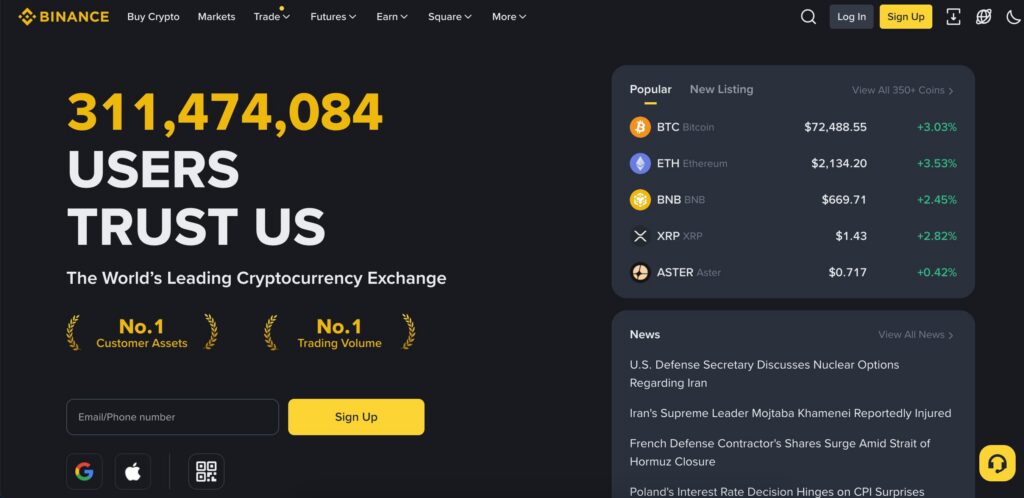
Binance operates as a centralized cryptocurrency exchange platform. The binance exchange facilitates buying, selling, and trading digital assets. From our testing, New Zealand users can access most core features with some regional considerations.
In the broader context of cryptocurrency in New Zealand, Binance functions primarily as an offshore trading venue rather than a locally regulated exchange. This distinction is important for users comparing international platforms with domestic crypto services.
Key facts for NZ users:
- Platform accessible via web browser and mobile applications
- No specific New Zealand regulatory license, operates as an offshore platform
- NZD direct deposit and withdrawal options limited compared to supported fiat currencies
- Binance reviews from NZ users highlight both extensive coin selection and regional payment challenges
- Account verification requirements apply based on withdrawal amounts and features used
Binance NZ Login & Account Access
The binance nz login process follows standard security protocols. We tested access from multiple devices to verify functionality. Login requires email or phone number plus password, with optional two-factor authentication strongly recommended.
Supported devices and access:
- Web browsers: Chrome, Firefox, Safari, Edge
- iOS app via App Store
- Android app via Google Play
- Desktop application for Windows and macOS
Login steps:
- Navigate to official Binance website or open mobile app
- Enter registered email address or phone number
- Input password
- Complete 2FA verification if enabled
- Solve security verification puzzle if prompted
Binance Wallet Explained (For NZ Users)
Understanding binance wallets explained requires distinguishing between custodial exchange wallets and self-custody options. The binance wallet on the exchange is custodial, meaning Binance holds the private keys. We examined how this affects New Zealand users.
During our review, we found the platform operates primarily as a hot wallet system for exchange holdings. Each cryptocurrency has a designated wallet where funds reside when not actively trading. This differs from cold storage solutions users might maintain separately.
| Wallet Type | Custody | Primary Use Case |
| Spot Wallet | Custodial | Trading and holding |
| Funding Wallet | Custodial | Deposits and withdrawals |
| Trust Wallet | Self-custody | Personal control outside exchange |
Binance Wallet Address
The binance wallet address functions as your unique identifier for receiving specific cryptocurrencies. We tested the process of locating wallet addresses across different assets. Many users ask where is my wallet address in binance, so we documented the exact navigation path.
Steps to find your wallet address:
- Log into your Binance account
- Navigate to Wallet, then select Fiat and Spot
- Click Deposit next to the cryptocurrency you want
- Select the network (ensure it matches your sending platform)
- Copy the displayed wallet address and network tag if required
Common mistakes we observed:
- Using wrong network when depositing (leads to lost funds)
- Forgetting memo or tag for assets like XRP or XLM
- Assuming all addresses work for all coins (each crypto has specific address format)
Binance Trading & Markets
We evaluated binance trading capabilities across spot and advanced trading interfaces. The binance markets section offers hundreds of trading pairs. Our testing focused on what New Zealand users would encounter in practical trading scenarios.
When comparing Binance activity to other trading venues used by NZ residents – such as Bybit NZ – we observed differences in interface design, derivatives availability, and risk controls rather than core spot trading functionality. These distinctions may influence platform choice depending on whether users prioritize simple spot trades or more advanced market instruments.
The platform provides both simple convert features and full trading interfaces. From our analysis, spot trading represents the most straightforward option while margin and futures require additional verification and understanding of leverage risks.
Available trading actions:
- Spot trading with market, limit, and stop-limit orders
- Convert feature for quick swaps between cryptocurrencies
- Margin trading with borrowed funds (requires verification)
- Futures contracts for leveraged positions
- Earn products for passive income (staking, savings)
Selling Crypto on Binance
To sell crypto binance offers multiple pathways. We documented the practical steps for converting cryptocurrency holdings to fiat or stablecoins. The selling process differs based on whether users want immediate market execution or prefer setting specific price targets.
Selling checklist:
- Verify crypto is in Spot Wallet (transfer from other wallets if needed)
- Choose selling method: Convert for speed, Trade for price control
- Select trading pair (e.g., BTC/USDT or ETH/BTC)
- Enter amount and confirm transaction
- Check transaction history to verify completion
Binance Withdrawal Process (Tested)
Our testing of binance withdrawal functionality revealed important distinctions between cryptocurrency and fiat withdrawals. Understanding how to withdraw from binance requires knowing available methods for New Zealand users and associated limitations.
We examined how to withdraw money from binance through various channels. The process to withdraw money from binance to bank account proved more complex than crypto withdrawals due to payment provider restrictions for NZ residents.
From our analysis, cryptocurrency withdrawals function reliably once verification requirements are met. Fiat withdrawal options remain limited compared to regions with direct banking integrations.
| Method | Time | Fees | Verification Required |
| Crypto withdrawal | 10-60 minutes | Network dependent | Basic for small amounts |
| Bank transfer (limited) | 1-5 business days | Variable by provider | Advanced verification |
| Third-party processor | Varies by service | Higher than crypto | Processor dependent |
Binance Pay & Binance Card

The binance pay feature enables peer-to-peer cryptocurrency transfers and merchant payments. We tested its functionality from a New Zealand perspective. The system works independently of traditional banking networks, relying on cryptocurrency transfers between Binance users.
Regarding binance card, availability varies by region. Our review found limited access for New Zealand residents. The card program primarily serves European and select Asian markets at the time of our testing.
| Feature | Availability in NZ | Primary Limitation |
| Binance Pay | Yes | Requires both parties use Binance |
| Binance Card | No | Geographic restrictions apply |
Security & Authentication
We extensively tested security measures including the binance authenticator system. Two-factor authentication significantly reduces unauthorized access risk. The binance google authenticator integration proved straightforward during our setup process.
Account security relies on multiple layers. From our analysis, users who enable all available protections experience fewer security incidents. The platform provides several authentication options beyond standard password protection.
Security layers tested:
- Password with complexity requirements
- Google Authenticator or SMS verification
- Email confirmation for withdrawals and login from new devices
- Anti-phishing code for email verification
- Withdrawal whitelist addresses
- Device management with ability to remove unknown devices
Using Binance Without Verification
Our testing explored how to use binance without verification and what limitations apply. Unverified accounts can access certain features but face significant restrictions. The platform has tightened requirements over time in response to regulatory pressures.
What works without verification:
- Account creation and login
- Viewing prices and market data
- Limited cryptocurrency deposits (subject to change)
What requires verification:
- Withdrawals above minimal thresholds
- Fiat currency transactions
- Margin and futures trading
- Full trading functionality and higher limits
Binance Helpdesk & Support
We evaluated binance helpdesk responsiveness across multiple channels. Support quality varied depending on the issue complexity and communication method. From our testing, simpler queries received faster resolution than account-specific problems.
Available support channels:
- 24/7 live chat for verified accounts
- Support ticket system via website
- Extensive FAQ and help center articles
- Community forums for general questions
| Issue Type | Approximate Response Time |
| General inquiries | Minutes to hours via chat |
| Account verification | 1-3 business days |
| Complex technical issues | Several days to weeks |
Sources & Transparency
Understanding sources binance provides helps users verify information independently. The platform publishes updates across several official channels. We examined where Binance discloses operational changes, security notices, and policy updates relevant to New Zealand users.
Official information sources:
- Binance announcements page for platform updates
- Fee schedule published in support documentation
- Terms of use and privacy policy for legal framework
- Security advisories for incident reporting
How to Delete Binance Account
We documented the process to delete binance account for users seeking account closure. The platform requires specific steps before allowing deletion. Understanding how to delete binance account properly ensures no funds remain and personal data gets removed according to stated policies.
Account deletion steps:
- Withdraw or convert all cryptocurrency holdings (zero balance required)
- Cancel any open orders across all trading pairs
- Disable all active loans or margin positions
- Navigate to Account settings, then Security
- Select Account closure option
- Complete identity verification if prompted
- Confirm deletion request via email
Important warnings:
- Account deletion is irreversible
- Any remaining dust amounts will be forfeited
- Transaction history becomes inaccessible after deletion
Final Verdict: Binance for New Zealand Users
Based on our comprehensive binance review, the platform offers extensive cryptocurrency trading capabilities with specific limitations for New Zealand users. Our testing revealed both functional strengths and regional constraints that affect the user experience.
Strengths identified:
- Wide selection of cryptocurrencies and trading pairs
- Multiple trading interfaces accommodating different experience levels
- Cryptocurrency withdrawal functionality works reliably
- Security features provide reasonable account protection
Limitations for NZ users:
- Limited direct NZD banking integration
- Binance Card unavailable in New Zealand
- No local regulatory oversight
- Fiat withdrawal options more restricted than crypto withdrawals
From our analysis, the binance exchange functions adequately for users primarily interested in cryptocurrency trading and willing to navigate fiat conversion through alternative methods. The platform serves experienced traders seeking diverse market access.
Users prioritizing direct bank integration and local regulatory protection may find the platform less suitable. Those comfortable with cryptocurrency-focused operations and third-party payment processors will encounter fewer obstacles.
Our review documentation reflects actual testing conducted from New Zealand. Feature availability and limitations may change as Binance modifies regional access or as local regulations evolve.
Binance New Zealand - Frequently Asked Questions
- Is Binance legal in New Zealand?
-
Binance is accessible from New Zealand, but it does not hold a local Financial Markets Authority (FMA) licence. The platform operates as an offshore exchange. NZ users can use it at their own discretion and remain responsible for tax reporting and regulatory compliance.
- Can I deposit NZD directly to Binance?
-
Based on our testing, Binance does not currently offer seamless direct NZD bank deposits comparable to local New Zealand exchanges. While some third-party payment providers may support NZD under specific conditions, these options are limited and often involve higher fees or additional processing steps. As a result, most NZ users fund their Binance accounts by transferring cryptocurrency from another exchange or wallet rather than depositing NZD directly.
- How long do Binance withdrawals take in New Zealand?
-
During our withdrawal testing, cryptocurrency withdrawals from Binance typically processed within 10 to 60 minutes, depending on blockchain network conditions and congestion at the time of the transaction. Fiat withdrawals routed through third-party payment processors generally required between one and five business days to reach completion. Verification level plays a significant role, as fully verified accounts tend to experience fewer delays than accounts with limited verification.
- Where can I find my Binance wallet address?
-
Your Binance wallet address is located within the Fiat and Spot wallet section of your account after selecting the Deposit option for a specific cryptocurrency and choosing the correct network. Each cryptocurrency uses its own address format, and some assets require an additional memo or tag to ensure funds are credited correctly. Using an incorrect network or omitting required tags was one of the most common causes of lost or delayed deposits observed during our review.
- What trading fees does Binance charge?
-
Binance spot trading fees start at 0.1 percent for both maker and taker orders, and these rates applied consistently to New Zealand users during our testing. The platform uses a tiered fee structure based on 30-day trading volume, with potential reductions for users holding BNB. Fees for margin trading, futures, and withdrawals vary depending on the product and blockchain network, making spot trading the most cost-predictable option for most users.
- Can I use Binance without verification?
-
Our testing confirmed that Binance allows account creation and basic access without completing identity verification, but unverified accounts face strict limitations. Withdrawals are capped at very low thresholds, fiat transactions are unavailable, and access to margin or futures trading is restricted.
- Can I get a Binance Card in New Zealand?
-
No, the Binance Card is not available to New Zealand residents. During our review, the card program was limited mainly to selected European and Asian regions, and geographic restrictions prevented NZ users from applying.
- How responsive is Binance customer support?
-
Based on our support testing, response times varied depending on the nature of the issue and the user’s verification status. General questions handled through live chat were often answered within minutes or hours, while account verification problems typically took one to three business days. More complex technical or account-specific cases sometimes required several days or longer to resolve.
Author